Crack Pdf Files with Ubuntu Linux!
Dont you hate when you run into a locked down pdf on the web? I search google all the time for title filetype:pdf and some are locked, this is the solution! PDFCrack is a GNU/Linux (other POSIX-compatible systems should work too) tool for recovering passwords and content from PDF-files. It is small, command line driven without external dependencies. The application is Open Source (GPL).
Features
* Supports the standard security handler (revision 2 and 3) on all known PDF-versions
* Supports cracking both owner and userpasswords
* Both wordlists and bruteforcing the password is supported
* Simple permutations (currently only trying first character as Upper Case)
* Save/Load a running job
* Simple benchmarking
* Optimised search for owner-password when user-password is known
Install pdfcrack in Ubuntusudo aptitude install pdfcrack
pdfcrack Syntaxpdfcrack -f filename [options]
pdfcrack Options
-b, - -bench - Perform benchmark and exit.
-c, - -charset=STRING - Use the characters in STRING as charset.
-m, - -maxpw=INTEGER - Stop when reaching INTEGER as password length.
-n, - -minpw=INTEGER - Skip trying passwords shorter than INTEGER.
-l, - -loadState=FILE - Continue from the state saved in FILENAME.
-o, - -owner - Work with the ownerpassword.
-p, –password=STRING - Uses STRING as userpassword to speed up breaking ownerpassword (implies -o).
-q, - -quiet - Run quietly.
-s, - -permutate - Try permutating the passwords (currently only supports switching
first character to uppercase).
-u, - -user - Work with the userpassword (default).
-v, - -version - Print version and exit.
-w, - -wordlist=FILE - Use FILE as source of passwords to try.
pdfcrack Examplepdfcrack mylocked.pdf
More information on this great utility can be found @ the authors site here
Lifehacker.com Has some alternative utilities and ideas for cracking pdf's here
UbuntuGeek has some information about this tool here
Howto: Crack Rar, 7z, and zip files with RarCrack in Ubuntu Linux
This program uses bruteforce algorithm to find correct password. You can specify which characters will be used in password generations.
Download RarCrack
wget http://superb-east.dl.sourceforge.net/sourceforge/rarcrack/rarcrack-0.2.tar.bz2 Install RarCrack
tar xvjf rarcrack-0.2.tar.bz2cd rarcrack-0.2sudo apt-get install libxml2-devmake ; sudo make installUsing RarCrack:
rarcrack your_encrypted_archive.ext [--threads thread_num] [--type rar|zip|7z]After the cracking started RarCrack will print the current status of cracking and save it's to a status file. If you want more specific password character set, you need to run RarCrack to create the XML status file (3 sec).
There will be a sample XML file, and you see there is a character set. If you want, you can modify this file and when you start RarCrack again the program will be use new variables.
Warning: Take care when you changing this file, make sure the current password don't have characters outside the abc[character set]!
Know of any other rar/zip/7z cracking tools worth mentioning?
More information on rarcrack can be found here
Convert Audio to other formats with Ease using Sox in Ubuntu Linux
SoX is the swiss army knife of sound processing programs. SoX is a command line utility that can convert various formats of computer audio files in to other formats. It can also apply various effects to these sound files during the conversion. As an added bonus, SoX can play and record audio files on several unix-style platforms. SoX is a general purpose sound converter/player/recorder that supports the following formats:
- RAW sound data in various data styles
- RAW textual sound data
- Amiga 8svx files
- Apple/SGI AIFF files
- SUN .au files
- PCM, U-law, A-law, G7xx ADPCM files
- mutant DEC .au files
- NeXT .snd files
- AVR files
- CD-R data (music CD format)
- CVS and VMS files (continous variable slope)
- GSM raw data (with optional library)
- Macintosh HCOM files
- Amiga MAUD files
- MP3 files (with optional external library)
- IRCAM SoundFile files
- NIST SPHERE files
- Turtle beach SampleVision files
- Soundtool (DOS) files
- Yamaha TX-16W sampler files
- Sound Blaster .VOC files
- Ogg Vorbis files (with optional external library)
- FLAC files (with optional external library)
- Dialogic/OKI ADPCM .VOX files
- Microsoft .WAV files
- PCM, U-law, A-law, MS ADPCM, IMA ADPCM, GSM, RIFX (big endian)
- Psion (PDA) Record.app files and A-law .WVE files
- Maxis XA Audio files
- EA ADPCM (read support only)
- Record and Play audio on various Unix platforms.
- null file type that reads and writes from/to nothing.
sox myfile.mp3 myfile.oggThe above command converts mp3 to ogg which is a cleaner format to use, you can use this command to convert files to any format above by just adding the file extention you want it converted to.
Then we can play the ogg file right from the command line and add a lil extra bass :)
play myfile.ogg bass +3 More information can be found on SoX on the developer's page here
Top Linux BitTorrent Clients For Ubuntu
I use BitTorrent for downloading music, movies and linux distro's. Back in the day bitTorrent didnt exist and I relied on bbs and ftp, these are two direct, centrally located ways that I shared files in the past. I also have played around with XDCC's on irc, gnutella, which most people know as limewire. While I will always prefer the old ways, like dialing up to the local bbs and logging in to a ftp, or swinging by an xdcc channel, the new alternative is... "just ok for now" I hope it is better optimized, more secure, and more anonymous in the future. I have tried all the command line BitTorrent clients, and they are awesome with memory/cpu usage but that isnt the preferred way anymore, most resort to GUI clients, and there are a few to choose from that kick ass. Here is a few to think about:
What is Deluge?
Deluge is a full-featured BitTorrent client for Linux, Mac OS X and Windows. It uses libtorrent in it's backend and PyGTK for it's user interface.
Deluge features a rich plugin collection; in fact, most of Deluge's functionality is available in the form of plugins.
Deluge was created with the intention of being lightweight and unobtrusive. It is our belief that downloading shouldn't be the primary task on your computer and therefore shouldn’t monopolize system resources.
Deluge is not designed for any one desktop environment and will work just fine in GNOME, KDE, XFCE and others.
Deluge is Free Software and is licensed under the GNU General Public License.
What about features?
Deluge has a wide-array of features, including:
- Web UI
- BitTorrent Protocol Encryption - Ability to force Encryption Inbound/Outbound, force handshake or full stream encryption
- Highly Configurable Network Settings - Tweakability
- Mainline DHT
- Local Peer Discovery (aka LSD)
- FAST protocol extension
- µTorrent Peer Exchange
- UPnP and NAT-PMP
- Proxy support
- Web seed
- Private Torrents
- Global and per-torrent speed limits
- Configurable bandwidth scheduler
- Password protection
- RSS
- Block List Importer - Import anti-P2P ip lists
- Desired Ratio Plugin
- Event Logging - logs blocked ip's network errors and network statistics/errors and other info
- Speed Limiter - Limit the speed per torrent upload/download
- Prioritize Files - Easily Select Downloadable files instead of every file in the torrent
- Network Health Monitor
- Torrent Creation
- Torrent Scheduler
- Low memory/cpu usage!
- And much more
How do I Install Deluge?
Click Here for one click Install if you are running Firefox with apt-url installed or:
sudo apt-get install deluge-torrentHow do I hack deluge to work on private trackers?
Check my older post that still works here on How to make deluge sp00f: http://www.ubuntu-unleashed.com/2007/09/setup-and-spoof-deluge-bittorent-client.html
What is Transmission?
Transmission is a lightweight client, for people that do not care about extra features, that want just a standard BitTorrent Client.What about features?
- Selective downloading and file prioritizing
- Encryption support, with option to ignore unencrypted peers
- Torrent file creation
- Peer exchange (compatible with Azureus and μTorrent)
- Automatic port mapping (using UPnP/NAT-PMP)
- MSE Tracker Extension support
- Fast Resume - with peer caching
- Auto-banning of peers who send bad data
- Sort and filter by tracker
- Single listening port for all torrents
How do I Install Transmission?
Click Here for one click Install if you are running Firefox with apt-url installed or:
sudo apt-get install transmissionWhat is Ktorrent?
KTorrent is a BitTorrent client written in C++ for KDE using the Qt user interface toolkit. It is maintained in the KDE Extragear. This is probably the best kde torrent client, but uses allot of cpu/ram
Features
- Upload and download speed capping / throttling & scheduling
- Internet searching with torrent search engines using KHTML part.
- Support for UDP trackers.
- IP address blacklist plugin
- Port forwarding with UPnP (Universal Plug and Play)
- Protocol encryption
- DHT (mainline version), and support for trackerless torrents
- µTorrent peer exchange (PEX) support (as of 2.1 RC1).
- File Prioritization
- Ability to import partially-downloaded files
- Directory scanner to automatically watch directories for new torrents
- Manual addition of trackers to torrents
- RSS feed support
- Web interface plugin with default por number 8080
How do I Install Ktorrent?
Click Here for one click Install if you are running Firefox with apt-url installed or:
sudo apt-get install ktorrentWhat is Azureus?
Azureus is a Bittorrent client written in java and comes bundled with many invaluable features for both beginners and advanced users that is very bloated...
What about features?
- Multiple torrent downloads
- Upload and download speed limiting, both globally and per torrent
- Advanced seeding rules
- Adjustable disk cache
- Only uses one port for all the torrents
- UPnP sets the forward on your router
- Can use a proxy, for both tracker and peer communications
- Fast resume
- Can set a default download dir and move completed files
- Can import torrents automatically from a set dir
- Highly customizable interface
- IRC plugin included for quick help
- Embedded tracker, host your own torrents, automate your shares (periodic scanning of a dir)…
- Distributed Hash Table: host on it a completely decentralised torrent and/or benefit from it when the tracker is offline.
- Auto-adjustment of your upload and download speeds according to your network charge with Autospeed
- Auto-download torrents with RSS Feed Scanner
- Schedule upload and download speed limits with Speed Scheduler
- Receive a mail when a download finishes with Status Mailer
- Add numerous info on torrents (Extra seeding columns, Country Locator)
- Remote control Azureus through the Swing Web Interface or the HTML Web Interface
Click Here for one click Install if you are running Firefox with apt-url installed or:
sudo apt-get install azureusYou Want A Terminal BitTorrent Client eh?
rtorrent/libtorrent is a nice ncurses based client, check it out here or apt-get install rtorrent
Got anything else worth mentioning?
Howto: Install awesome Music Visualizations for Rythmbox and XMMS In Ubuntu
I absolutely love visualizations while listening to music, its unfortunate that Ubuntu does not currently have many presets, Fortunately here is a quick way to enjoy a few other visualizations in Ubuntu, personally I think these visualizations should have been installed by default with Rythmbox!
If your in Firefox and have apt-url installed click here to install this with one click!sudo apt-get install libvisual-0.4-plugins
Ok now Reload Rythmbox and click on Visualization, and you will get a drop down List of the GOOM Alternative Visuals
Hopefully when I get a chance I will port over winamp visuals to rythmbox but, that may take some time hehe



Detect Port Scans on your Ubuntu System
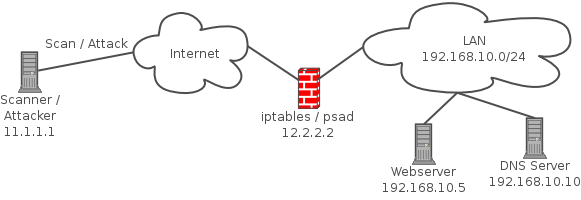
PSAD is a collection of four lightweight system daemons written in Perl and in C that is designed to work with Linux firewalling code (iptables in the 2.4.x kernels, and ipchains in the 2.2.x kernels) to detect port scans. It features a set of highly configurable danger thresholds (with sensible defaults provided), verbose alert messages that include the source, destination, scanned port range, begin and end times, tcp flags and corresponding nmap options (Linux 2.4.x kernels only), reverse DNS info, email alerting, and automatic blocking of offending ip addresses via dynamic configuration of ipchains/iptables firewall rulesets. In addition, for the 2.4.x kernels psad incorporates many of the tcp signatures included in Snort to detect highly suspect scans.
Lets install it shall we?
clickme for 1-click install or:sudo apt-get install psad
To check PSAD status simply run:sudo psad -S
or psad –Status
For more Detailed documentation about PSAD configuration, alerting and logging howto check out:
http://www.cipherdyne.org/psad/docs/
Clean up Duplicate Files, Symlinks, Directories in Ubuntu with an easy GUI!

I have 8TB of archived music, movies, games, applications,iso's, and documents from the past 12 years that I have saved and accumulated and have been plagued by having the same files copied in multiple locations across all my drives. Over the years I have re-downloaded music, movies, and tons of other things that I already have... It really sucks when I download something and run this application and notice I already have it... Other than this issue, I have gigs of config files that are duplicates that needed to be cleaned. So ive been using a program called FSLint, It means Filesystem Lint. So lets get to work and clean the lint from our drives shall we?
Lets install FsLint
clickme for 1-click install! or:sudo apt-get install fslint
Ok now that FsLint is install you will be able to access it via Applications->System Tools->FSLint
As default it will have your home directory selected.
Here are the options you have to choose from:
Find Duplicate Files
Find Installed Packages
Find Bad Named files
Find Name Clashes
Find Temp Files
Find Bad/Broken Symlinks
Find Bad Id's
Find Empty Directories
Find Non-Striped Binaries
Find Redundant Whitespace
You are given Advanced Search options to exclude certain directories that dont apply to the above Search Patterns
Once you select one of the search options and select your search directory, click find, it will take a while depending on drive speed, processing power, and drive size. Once done searching it will give you options to delete the duplicates, save duplicate list and Merge.
I hope this tool is helpful to others, I personally think this tool should be integrated into nautilus.
Happy Cleaning!


